Reference Lists
The Reference Lists page is used to create and edit reference lists that store client information to be used when defining rules. These lists range from Whitelists and Blacklists that raise alerts when a known entity is involved in a transaction, to risk-based lists where you assign risk ratings to specific fields such as countries, industries, or transaction types.
Search Filters
Use the filters below to find specific reference lists. Each field is type-specific to help ensure the correct format.
- The Name field supports partial matching, useful for finding lists with specific keywords.
- Use Modified By to filter lists managed by a specific team member.
Included Filters
| Filter | Type | Description |
|---|---|---|
| Date | Date Picker | Filters lists by the date they were last modified. |
| Name | Text | Filters by list name, partial matching supported. |
| Field | Multi Select | Fields associated with the list. |
| Field Type | Single Select | Field type for the list (Enum or Text). |
| List Type | Single Select | List type for the list (Item Based or Risk Based). |
| Modified By | Multi Select | Filters lists based on the user who last modified them. |
Reference Lists Table
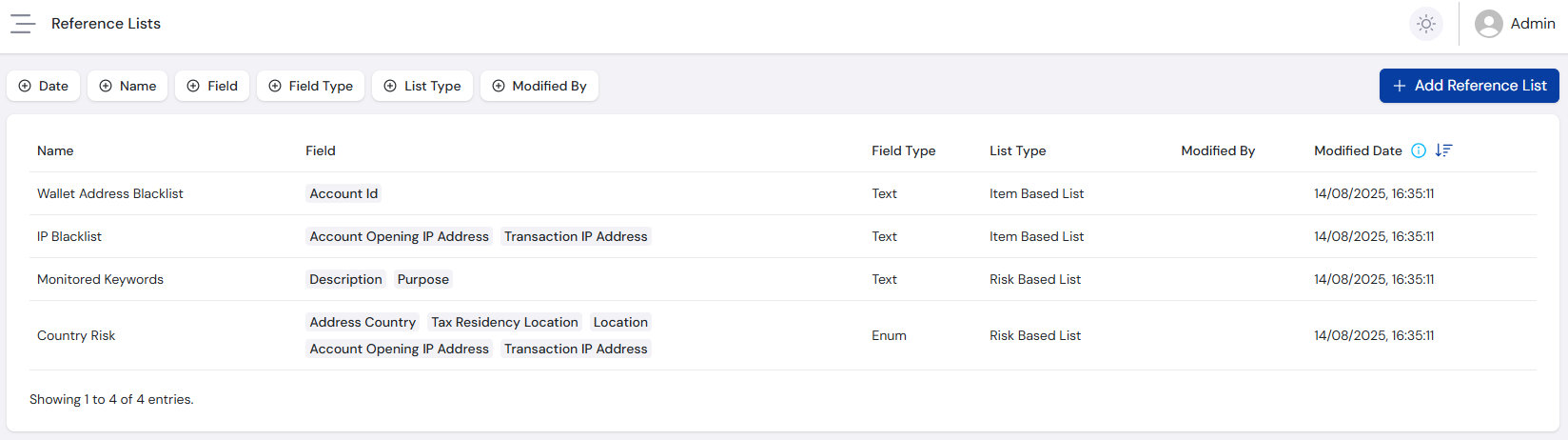
After applying search filters, the results appear in a paginated table:
Reference List Columns
| Column | Description |
|---|---|
| Name | User-defined name. |
| Field | Fields associated with the list. |
| Field Type | Field type for the list (Enum or Text). |
| List Type | List type for the list (Item Based or Risk Based). |
| Modified By | User who last modified the list. |
| Modified Date | Date and time the record was last modified. |
Manage Reference List
FraudShield includes four pre-defined reference lists that can be used with existing or new rules:
- Country Risk - A Risk Based List for defining countries you regularly interact with and assigning them a risk rating from Low to Prohibited. Use this list with the
Address Country,Tax Residency Location,Location,Account Opening IP AddressandTransaction IP Addressfields, as they all expect an ISO-defined country code. - Monitored Keywords - A Risk Based List for defining words to monitor and assigning them a risk rating from Low to Prohibited. Primarily used to raise alerts for dangerous or illegal words. Use this list with the
DescriptionandPurposefields, as they accept freeform text. - IP Blacklist - An Item Based List for defining IP addresses identified as risky or blacklisted, raising an alert if matched. Use this list with the
Account Opening IP AddressandTransaction IP Addressfields. - Wallet Address Blacklist - An Item Based List for defining wallet addresses identified as risky or blacklisted, raising an alert if matched. Use this list with the
Account IDfield.
Add Reference List
Additional reference lists can be created for any field supported by FraudShield by selecting the Add Reference List button. Enter the following details:
- Name - User-defined name for the list. Name this as accurately and succinctly as possible - it appears in the Rule Builder.
- Field Type - Defines what fields can be added to the list:
- Enum - Enums describe fields where the system expects pre-defined values to be entered, such as the
Countryfield expecting an ISO-defined country code, or theTransaction Typefield expecting a FraudShield-defined transaction type. - Text - Text fields can have any value provided (while still following validation rules), such as the
DescriptionorNamefields.
- Enum - Enums describe fields where the system expects pre-defined values to be entered, such as the
- List Type - Defines if only list items will be present, or if list items will have an associated risk value:
- Item Based List - Only the item itself is stored on the list, with no associated risk rating (e.g. the IP Blacklist). This option is only available for Text field types, since the values for Enum fields are pre-defined and it only makes sense to give them risk ratings.
- Risk Based List - Every item on the list must include an associated risk value (e.g. the Country Risk list). This option is available for both the Text and Enum list types.
- Field - Defines which fields the reference list applies to in rule building. The field options are populated based on the chosen Field Type. Enum type lists only support a single field, as the options are pre-defined. Text type lists can support multiple fields where it makes sense, such as the Monitored Keywords list.
- Description - Required description. Does not affect system behaviour.
The details entered when creating a reference list cannot be modified after it is saved, except for the description. This prevents breaking existing rule functionality. If changes are required, create a new reference list instead.
This does not affect adding or editing items on the list.
Edit Reference List Items
Select a list from the table to add and edit items.
Add Items
Add items in two ways:
- Add Single Item - A prompt appears to enter the item details. An Item Based List requires the Item, while a Risk Based List requires the Item and an associated Risk Level.
- Batch Upload - Opens a batch upload page where a Sample CSV can be downloaded. Upload a batch file in the following format, with an optional file description:
- Item Based List - One column:
ListItem. Each row should contain a list item. - Risk Based List - Two columns:
ListItemandRisk. Each row should contain a list item and its associated risk value: Low, Medium, High, Prohibited. Every item must have a risk level assigned.
- Item Based List - One column:
An Upload History button is available, allowing you to view the status and details of any previously submitted batch file for that reference list.
Edit Items
A table lists all items, including the Item, Risk Level (if a risk list), Created Date, Modified Date, Modified By, and Submission Method (Batch or Single Item).
Use the action buttons to Edit or Delete items.
For information on using reference lists within rules, see the Rule Builder guide.