How AI Risk Scoring Works
The AI Engine gives each processed transaction an AI risk score from 0 to 100, alongside the results of your rules. The score is a complementary signal to your rules, not a replacement for them. Rules still decide whether a transaction is flagged, while the AI risk score shows how close the transaction came to breaching them.
Why Use AI Risk Scoring
A rule either flags a transaction or it does not. A transaction that sits just under every threshold in your rule plan passes all of them, even when its overall profile is close to what your rules are designed to catch.
The main value of the AI risk score is surfacing these transactions - ones that triggered no rule, but whose profile came close to breaching the rules in your plan. A high score on a transaction a rule has already flagged adds confirmation, but tells you less that is new.
How a Model Learns
A model is trained for a single Rule Plan. Each training run is a training pipeline that works through three stages:
- Generate Synthetic Data - Builds a set of synthetic transactions from the rules in the plan.
- Extract Features - Works out the values the model learns from, including the underlying values of each rule.
- Train Model - Trains the model on those values.
The model learns how close activity comes to breaching the rules in that plan. Only Finalised plans can be trained, and because a Finalised plan's rules can never change, a model remains a match for its plan for as long as you use it.
For the steps to train a model and put it to work, see Training and Activating a Model.
The AI Risk Score
The AI risk score runs from 0 to 100. Higher scores mean the activity came closer to breaching your rules and is more likely to need review.
The AI risk score is calculated independently of your rule results and does not change when a rule triggers - the rule decision and the model's assessment are separate signals. A rule's underlying values are among the inputs the model uses.
FraudShield does not derive a risk level (Low, Medium, High or Urgent) from the score itself. The only mapping from the score to a risk level is the one you configure in Auto Case Creation.
Reading the two signals together helps you decide where to look first:
| Rules | AI Risk Score | What it tells you |
|---|---|---|
| Flagged | High | Both signals point the same way, confirming the rule result. |
| Flagged | Relatively low | A rule caught the transaction, but the model did not rate it as risky overall. The flagged rule still stands, so review it as you normally would. |
| Not Flagged | High | The transaction came close to breaching your rules without crossing a threshold. This is the main case AI scoring is designed to surface. |
| Not Flagged | Low | Neither signal suggests the transaction needs review. |
Which Model Scores a Transaction
Each environment, Production and Test, uses the model enabled for that environment on that environment's Active Plan. A rule plan can have one model enabled for each environment, and the model only scores transactions while its plan is the active plan for that environment.
If the active plan has no model enabled for the environment, transactions are not scored:
- Dashboard - No AI information is shown for the transaction.
- API - The Submit Single Transaction response returns
aiRiskAssessmentwith astatusofNotEnabled.
When Scoring Happens
Every transaction processed through your rules is scored:
- API submissions - A transaction sent to the Submit Single Transaction API is scored before the response returns.
- Batch uploads - Transactions are scored while the batch is processed. A batch keeps the model that was active when it was submitted, and Batch Upload shows the AI Model Pipeline ID that scored it.
- Re-evaluations - A re-evaluated transaction or batch is scored with the model enabled on the active plan at the time you re-evaluate it.
Batches submitted with Skip rule processing for this batch selected are not processed against rules, so they are not scored either.
When Scoring Fails
AI scoring never blocks transaction processing. If the AI Engine is unavailable, the transaction is processed on your rules alone:
- Dashboard - The AI Risk Assessment panel shows "AI risk assessment could not be completed. The risk score is unavailable."
- API - The response returns
aiRiskAssessmentwith astatusofErrorand anerrorMessage.
A transaction without a score is never used for Auto Case Creation.
Explaining a Score
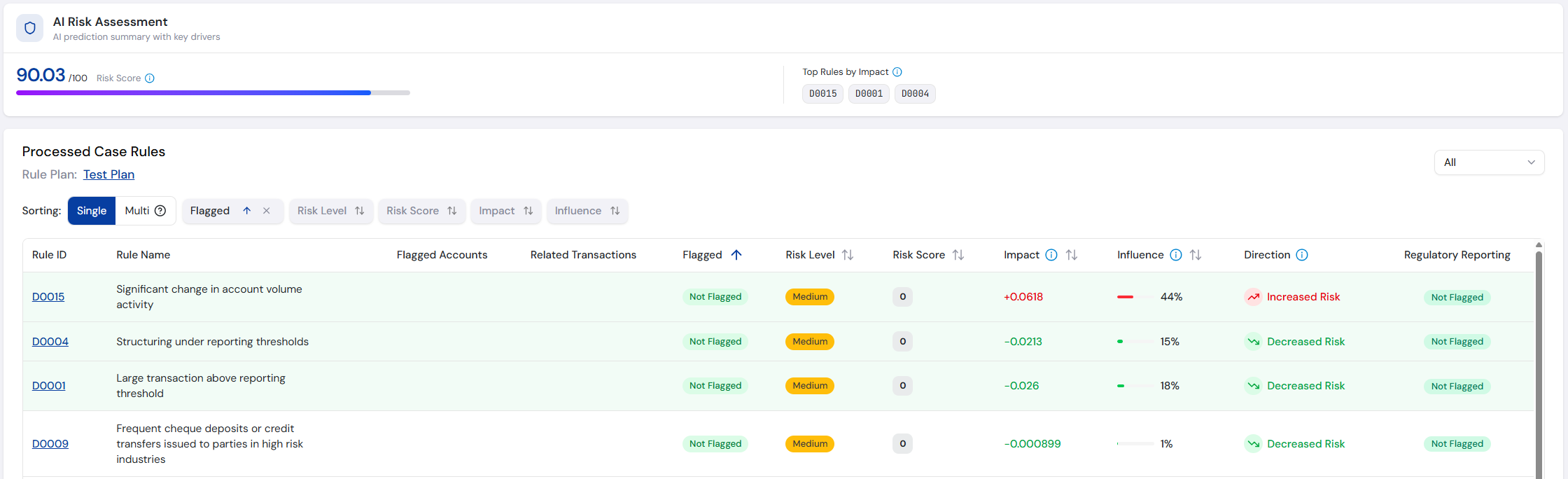
Alongside the score, FraudShield shows which rules had the most effect on it. The Top Rules by Impact lists the rules with the largest effect on the AI risk score, in either direction - up to three, ranked by the size of their Impact.
Each processed rule also carries its own explanation:
Rule Explanation Columns
| Column | Description |
|---|---|
| Impact | How many points this rule pushed the AI risk score up or down, compared with a typical transaction. Positive values pushed it up and negative values pulled it down. Impacts explain why the transaction scored higher or lower than usual, so they do not add up to the total score. |
| Influence | How much this rule mattered to the AI risk score, relative to the other rules. Always a positive share, with the percentages adding up to 100%, so it does not show which way the rule pushed the score. |
| Direction | Whether this rule pushed the AI risk score up or down, from the sign of its Impact: Increased Risk, Decreased Risk or Neutral. |
Impacts are calculated using SHAP, an industry-standard explainability method.
Rules Triggered
A Rules triggered badge appears next to the score when a rule flagged the transaction. Hover over it for a reminder that the AI risk score is calculated independently and does not change when a rule triggers, although the rule's underlying values are among the inputs the model uses.
When a rule flagged a transaction that still scored relatively low, the tooltip also notes that the transaction triggered a rule despite having a relatively low risk score. This marks the transactions where the two signals disagree.
Auto Case Creation
Rules create cases as normal. Auto Case Creation Based on AI Risk Score adds a second route: when a transaction triggers no rules but its AI risk score falls within a range you have enabled, FraudShield creates a case with that range's risk level.
The ranges are configured per risk level in Case Settings and apply to both environments. For the full set of options, see Auto Case Creation Based on AI Risk Score.
Where the Score Appears
- Transaction Details - The AI Risk score under the page header, with a link to the rule breakdown.
- Processed Rules - The AI Risk Assessment panel and the Impact, Influence and Direction columns.
- Cases Table - The sortable AI Risk Score column, and the Min AI Risk Score and Max AI Risk Score filters.
- Case Information - The AI Risk tile, and the same AI Risk Assessment panel under Processed Rules.
- Customer Cases - The AI Risk Score column on a customer's Cases tab.
- Exported Case Reports - The AI Risk Assessment section and the per-rule values in the case PDF.
- Submit Single Transaction API - The
aiRiskAssessmentobject, andinfluenceandimpacton each processed rule.
Now that you know what the AI risk score means, follow Training and Activating a Model to train a model for your rule plan and start scoring transactions.